Nippon Labs
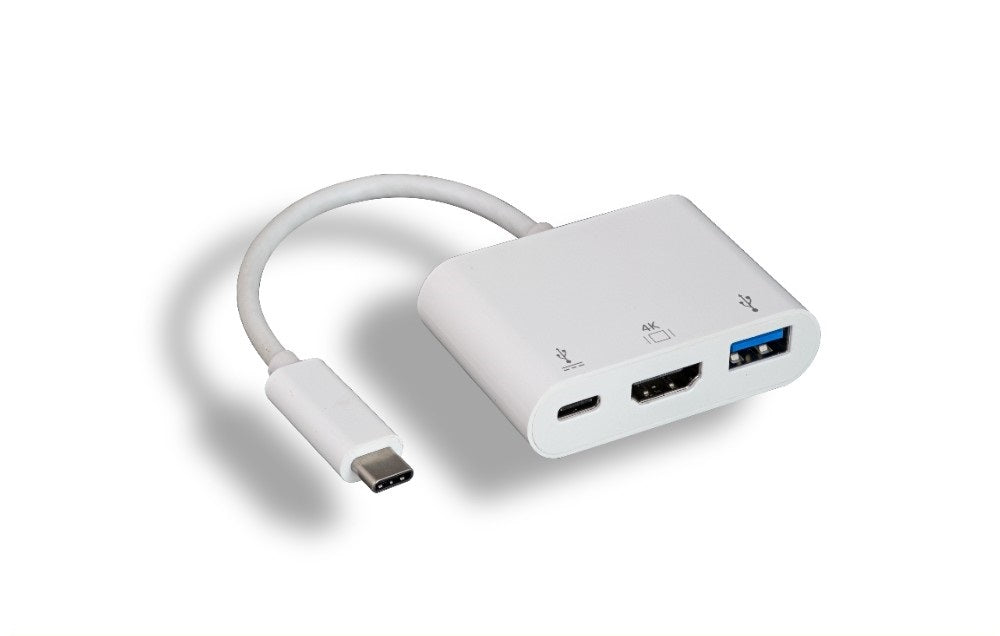
Nippon Labs USB-C Hub, White USB 3.0 + HDMI + USB-C, 4K@30Hz Charging Adapter
Nippon Labs USB-C Hub, White USB 3.0 + HDMI + USB-C, 4K@30Hz Charging Adapter
Couldn't load pickup availability
This hub plugs into one USB-C port and gives you an HDMI socket for a monitor, television or projector, a full size USB 3.0 Type-A port, and a USB-C port for pass through charging. It is built for laptops and tablets that have only USB-C ports and need a display, a standard USB device and power at the same time.
Specifications
- Input: USB-C male
- Video output: HDMI female, up to 4K at 30Hz
- USB data port: one USB 3.0 Type-A at 5Gbps
- Charging port: one USB-C for pass through charging
- Requires DP Alt Mode: yes
- Color: white
Good for
- A desk setup where one plug brings the external monitor, an external drive and the charger online together
- Slide decks and spreadsheets on a meeting room television or projector
- Digital signage and always on screens driven from a small USB-C machine
FAQ
Will this work with my laptop or phone? The USB-C port on your device has to support DP Alt Mode, sometimes listed as video out or Thunderbolt. Most USB-C laptops and many tablets and phones do, but some budget laptops and older Android phones have data only USB-C ports, and video will not work on those. If your port carries Thunderbolt 3 or Thunderbolt 4, it is supported.
Is a cable included? No. This is an adapter with a socket on the output side, so you use your own cable from the adapter to the display.
What does 4K at 30Hz mean next to 4K at 60Hz? The refresh rate is how many times per second the picture is redrawn. At 30Hz the image is sharp and steady, which is fine for presentations, spreadsheets and signage, but video and mouse movement look less smooth than at 60Hz. If smoothness matters to you, our 4K 60Hz USB-C to HDMI adapter is the one to buy.
Can I keep the laptop charging through this hub? Yes. Plug your own laptop charger into the USB-C port on the hub and power passes through while the display and the USB device stay connected.
Specifications
| Connectors | USB-C to USB-A + HDMI + USB-C |
| Color | White |
Guides & resources
Why USB-C cables behave differently
USB-C to HDMI vs USB-C to DisplayPort
Share